|
|
|
|
|
 |
|
|
|
|
|
 |
|
 |
Use text processing and character of the curve
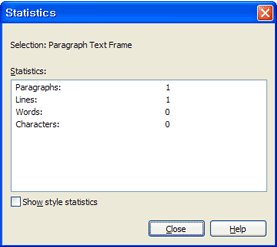
All strings used in the document text and the curve have to characterizeto prevent processing trouble.
How to handle the curve
① SSelect both objects, groups have worked to release them.
② Edit menu > select All> string command to select all the text.
③ An array of the selected text > Curves (Ctrl+Q) command to handle the curve.
④ String in the window all the statistics, “0”mark to make sure.
Shapes, Curved shapes for use, should be handled. |
|
|
Bitmap and effective treatment
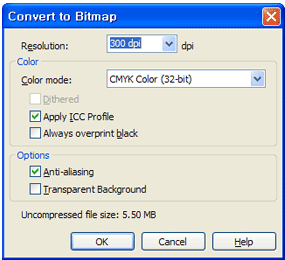
Except the text, images, and background(Gray fill), including the conversion of a bitmap, please convert to Bitmap image.(Do not check when converting bitmaps must be transparent by translating.)
Please GIF bitmap format to work with 300dpi resolution and color as a CMYK.
When spun the bitmap images in the CorelDraw the image resolution may be garbled. Therefore, the bitmap is not to use difference in proportions
Edit menu in the form of effects, blends, three-dimensional characters, lenses, power clip, and when used can cause errors in the output. When used it is safe to convert to a bitmap
When converted to a bitmap texture may change to fill white. This texture does not come out, do not recommend using it.
OLE object part should not be edited in Corel. Especially in rotation, typesetting does not need to rotate when you cannot get an error message, do not use it. If you need to insert an object in the program to save and it is safe to important from Corel.
When you use the shadows when the shadows do not print or cannot get out to K100%. After removing the shadow and the shadow bitmap effect that it is safe to handle.
When using clip art even CorelDraw it is often set to overprint fill. Be sure to disable it and set to overprint fill if you disable or bitmap will be converted to.
Script error in the output must convert it to bitmap, so you must convert it to bitmap image.
When using channels and masks in Photoshop an Corel must convert it to bitmap.
Especially, if you do using the bitmap in Corel, rotation or reversal, you must reduce or increase converted to a bitmap.
You must convert Script error in the output to bitmap.
When you using channels and masks in Photoshop and Corel must convert it to bitmap.
Especially, if you do using the bitmap in Corel, rotation or reversal, you must reduce or increase converted to a bitmap. |
|
|
Color Processing
Color Mode – CMYK is the default color of the print. Working with others if the color output, or not at all unexpected colors may appear different.(RGB, PANTONE, LAP, DIC, etc).
pictures or objects coming into RGB, need to make sure it.
PANTONE color or RGB to switch to CMYK at once?
① Fill in the information or documents to the CMYK colors other than outline checked to make sure. (The document information can be found easily by right-click an empty space.)
② If you see other color of CMYK, such as when the case is detected in the following ways you can solve.
③ Edit>Replace Find >Replace Wizard to open a window object to change.
④ On the first screen select the color model or palette and then click Change.
⑤ Information from the documents obtained by the second screen, the color is part of the model that is complete, click to select.
⑥ In the third screen, click Replace all.
⑦ Replace all were unable to find the object you selected in step 4 to find the color palette, and then the process is repeated. |
|
|
Fill with overprinted
If you edit the object on background with black text area, must fill the black text overprinted with the command (OverPrint) will have to set. (These feature black text on the part of the background does not knock the pins do not fit when overprinting black text to be printed solves the problems of exposure to white.) Fill the black overprint commands (K100%) is only letters and good background for the area. |
|
|
Document Information
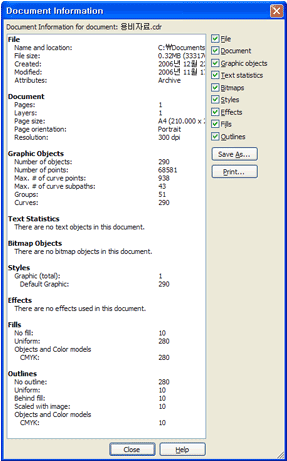
The document must make sure to save when finished to the File information and source of files. Working document to be left in the string must not include an RGB object. Information shown on the document or an external connection object using the string still remaining and RGB objects must be correct if the editing document. |
|
|
|
|
|
|
|
|
|
|
|
TEMCO, 2F, Janggy St. 65 11-6, Dalseo, Deagu, South Korea 42699 / 503-15-34508
Phone : +82 53.621.3203
Fax : +82 53.621.3207
Call Center : +82 53.621.3204 e-MAIL : info@eprintok.com |
|
|
|
|
|
| Copyright(c) 2011 eprintOK. All rights reserved |
|
|