|
|
|
|
|
 |
|
|
|
|
|
 |
|
 |
Document setting
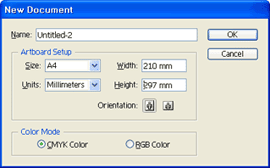
You must be set to Color mode > CMYK color when you open a new document in Illustrator. After work in RGB mode to CMYK mode to convert the color conversion occurred because the operation of the computer screen and print out have color difference. For color print jobs must be to select the color mode to CMYK mode. |
|
|
Fonts
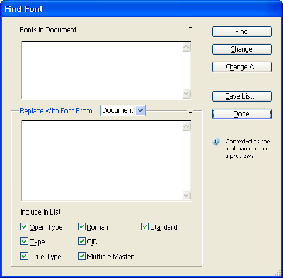
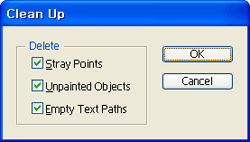
The text should be used in documents also outlined the design work after completing design (Create Outline). In this process check out on the menu Type > Find Font to determine whether the text information remains. In addition to the text using Type tool, click an empty space, even if the fonts are left with the text information. In this case, Object > Path > Clean up on the menu to remove the empty text box. In Cleanup window, Stray Points, Unpainted Objects, Empty Text Paths option is checked and click OK button.
 |
|
|
Transparent effect
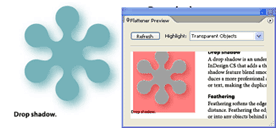
Blending modes, feathers, drop shadows, opacity effects in Illustrator, such as setting transparency when using transparent object is created. The effect of combined treatment with the object unless the final output, in postscript output for printing in advance so be sure to cause trouble margining(Flatten) should be treated. Transparent effect is used to select objects from the menu Object>Flattern Transparency command to select. Flatten Transparency in Windows Raster / Vector Balance> 100 to set up and click the OK button.
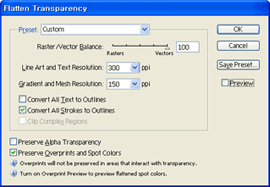
From the menu in Windows Flattener Preview window transparency effects can be used to determine if the object remains.
 |
|
|
Various filter effects
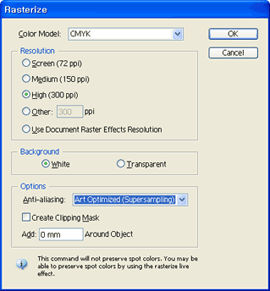
The dotted lines to the effect when given Stroke Brush, Effect, Filter, Gradient effects of actions when using the Object Rasterize necessarily need to create a process image. Effect and Filter have been used, especially after the job you must Rasterize the stroke before saving. |
|
|
Object color (CMYK/Spot Color)
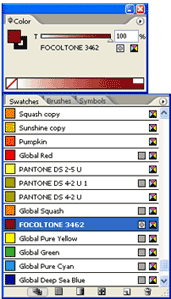
Specifically to spot-plate output, unless you want to print, select the entire object from the menu Filter > Colors > Convert to CMYK by selecting the command cycle, all objects should have converted to CMYK. If the object remains RGB output, when printed to colors to CMYK separations because the original work and vary. |
|
|
Out-lined
If you must use the outline from the menu Object > Path > Outline, please give the objectified by Outlined menu.
 |
|
|
Loaded Image processing
Bring on the saved image in Illustrator, Photoshop, please use the menu File>Place command to bring up. Link Load images in Windows without having to check the items that need to load the image files are embedded in Illustrator. |
|
|
Illustrator Final check of file
Illustrator in the menu Windows > Document info window that appears when you select the command to check the following: RGB Object and Transparent Objects, Transparent Group, Spot Color Object, Fonts, Linked Image, Pattern Objects, Gradient Objects, Brushed Objects, Stylized Objects, Opacity Mask entry should be marked NONE. The above items are not displayed NONE numbers (2, 5, etc) as long to find the object described above must be taken care of. |
|
|
|
|
|
|
|
|
|
|
|
TEMCO, 2F, Janggy St. 65 11-6, Dalseo, Deagu, South Korea 42699 / 503-15-34508
Phone : +82 53.621.3203
Fax : +82 53.621.3207
Call Center : +82 53.621.3204 e-MAIL : info@eprintok.com |
|
|
|
|
|
| Copyright(c) 2011 eprintOK. All rights reserved |
|
|